

I Tested 28 Workflow Automation Software In 2026: My Top Picks

10 Best Workflow Automation Software Shortlist


The best workflow automation software helps you orchestrate end-to-end processes that automatically trigger actions across multiple platforms based on conditional logic and real-time status changes. It is commonly used for provisioning accounts in internal systems, approval workflows, assigning kickoff tasks to cross-functional teams, and updating CRM records. Without it, teams waste hours on low-value work, suffer from miscommunication, and experience delays in project delivery.
Through my 20+ years of hands-on experience using and testing dozens of workflow automation platforms as a project manager, I’ve seen just how impactful the right tool can be. From reducing manual tasks to speeding up routine approvals, the best software can help you focus on strategic work and client communication instead of administrative busywork.
Here are my top picks based on real-world testing. I’ve highlighted each tool’s strengths so you can quickly find the one that best suits your workflows and goals.
Why Trust Our Workflow Automation Software Reviews
We’ve been testing and reviewing workflow automation software since 2012. As project managers ourselves, we know how critical and difficult it is to make the right decision when selecting software.
We invest in deep research to help our audience make better software purchasing decisions. We’ve tested more than 2,000 tools for different Project Management use cases and written over 1,000 comprehensive software reviews. Learn how we stay transparent & our workflow automation review methodology.
Compare Specs Side-By-Side
This comparison chart summarizes basic details about each of my top workflow automation software selections. See pricing details and the availability of free trials or demos side-by-side to help you find the best platform that works for your budget.
| Tool | Best For | Trial Info | Price | ||
|---|---|---|---|---|---|
| 1 | Best for no-code AI-powered workflow automation | Free demo available | Pricing upon request | Website | |
| 2 | Best for standardizing processes | Free plan available | From $9/user/month (billed annually) | Website | |
| 3 | Best for dynamic workflows | 30-day free trial + free demo available | From $9/member/month (billed annually) | Website | |
| 4 | Best for workflow automation flexibility | Free plan + free demo available | From $7/user/month (billed annually) | Website | |
| 5 | Best for no-code workflow building | Free plan available | From $19.50/month (billed annually) | Website | |
| 6 | Best with Salesforce document automation | Free demo available | From $399/month (billed annually) | Website | |
| 7 | Best for scaling organizations | 14-day free trial + free plan available | From $10/user/month (billed annually) | Website | |
| 8 | Best for cross-functional processes | 15-day free trial | From $19/user/month (billed annually) | Website | |
| 9 | Best for robust API management capabilities | Free demo available | Pricing upon request | Website | |
| 10 | Best for custom LLMs | Free trial available + free demo | Pricing upon request | Website |


-

Accelo
Visit WebsiteThis is an aggregated rating for this tool including ratings from Crozdesk users and ratings from other sites.4.4 -
Celoxis
Visit WebsiteThis is an aggregated rating for this tool including ratings from Crozdesk users and ratings from other sites.4.4 -
Wrike
Visit WebsiteThis is an aggregated rating for this tool including ratings from Crozdesk users and ratings from other sites.4.3




Best Workflow Automation Software Reviews
Here’s a brief description of each workflow automation solution to showcase each tool’s best use case and noteworthy features.


Screendragon is a no-code workflow automation platform designed for marketing and creative operations. It combines project management, resource planning, and approval workflows into one platform, helping teams reduce inefficiencies and focus on high-value work.
Why I Picked Screendragon
I picked Screendragon because it enables teams to build automated workflows tailored to their needs without writing code. Other features include dynamic custom forms and digital approval management, which can help streamline complex processes. I appreciate how it integrates AI and governance rules to make sure your team can focus on high-impact tasks without being bogged down by administrative hurdles.
With advanced permission controls and real-time insights, Screendragon provides the tools necessary for effective management and collaboration, which makes it a standout choice for global brands and agencies.
Screendragon Key Features
Screendragon offers a variety of other features that enhance workflow automation for marketing and creative teams.
- Advanced Reporting: This provides detailed insights into project visibility so you can track progress and performance across various campaigns.
- Integrated Feedback and Approval Tools: These facilitate collaboration by letting team members give and receive feedback directly within the platform and streamlining the approval process.
- Task Management: You can manage tasks, allocate resources, and track time, which helps you make sure all project elements are coordinated efficiently.
- Customizable Dashboards: You can tailor views and data presentation to suit your specific needs. This gives you control over how information is displayed and accessed by your team.
Screendragon Integrations
Integrations include Microsoft Teams, Slack, SharePoint, Power BI, Google Workspace, Workday, Jira, SAP, and thousands of others via API or Zapier.
Pros and Cons
Pros:
- AI agents integrated directly into project workflows
- Built-in resource and budget planning tools
- Highly customizable workflows for complex teams
Cons:
- Complex and not suited for small teams or simple projects
- Time-intensive onboarding may delay initial setup
New Product Updates from Screendragon
Screendragon Unveils New AI Hub
Screendragon introduced AI Hub, a new capability that lets teams build and manage AI agents directly within workflows. The update helps marketing teams automate tasks, maintain governance controls, and scale AI-driven operations more efficiently. For more information, visit Screendragon's official site.

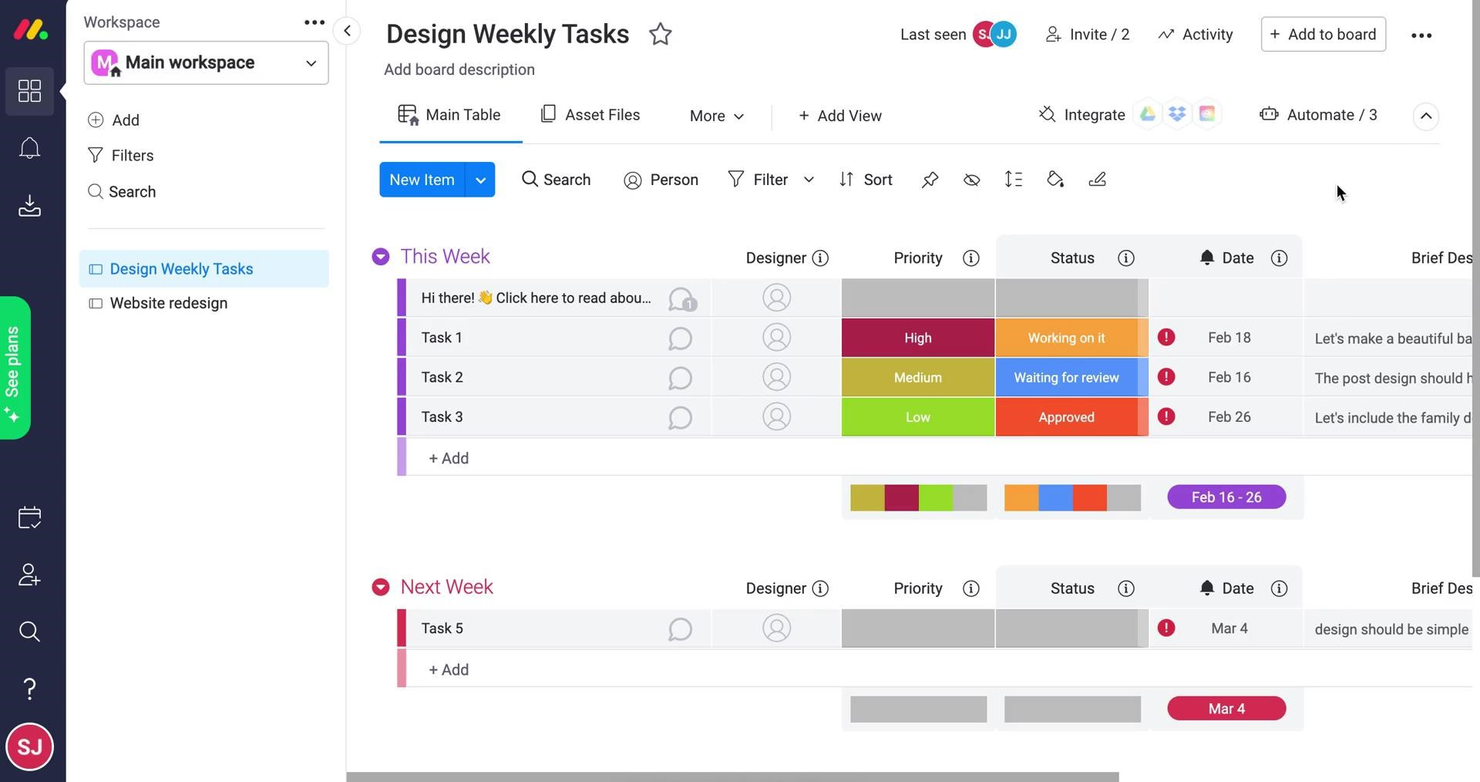
monday.com is a work management platform that has an automation module that helps you be more productive at work. The workflow automation features cut out repetitive tasks and ensure that your processes become standardized. As Ken Sarmadi puts it, “It’s one of the few platforms that can handle complex workflows and build interconnected systems effectively.”
Why I Picked monday.com
I like its visual workflow builder, known as monday workflows. This tool allows you to create standardized workflows using drag-and-drop blocks that represent triggers, conditions, and actions. For example, you can set up a workflow that automatically assigns tasks to team members when a new item is created, adds a delay before sending a follow-up notification, and updates the task status based on specific conditions.
Another standout feature is the AI-powered workflow generator. By simply typing out a description of the workflow you want, such as "manage and track incoming IT support requests," the AI can generate the entire workflow for you.
monday.com Key Features
In addition to process standardization capabilities, monday.com offers a variety of other features for workflow automation.
- Real-Time Insights: This feature provides visibility into ongoing processes so you can quickly identify and resolve any issues that arise.
- User-Friendly Interface: With a no-code or low-code platform, your team can create custom workflows without technical skills, which makes it accessible to all departments.
- Automated Notifications: This lets you set up automated alerts to keep your team informed about project updates without manual intervention.
- Time Tracking: You can monitor how much time is spent on tasks to boost efficiency and manage your resources more effectively.
monday.com Integrations
Integrations include Slack, Google Drive, Gmail, Typeform, Trello, Twilio, Google Calendar, Jira, GitHub, Trello, Dropbox, and Typeform. There are also thousands of other apps you can connect to using a paid Zapier account.
Pros and Cons
Pros:
- Easy to create notification flows
- Long list of supported integrations
- Easy to customize a workflow or board
Cons:
- May not be ideal for very complex workflows
- May be too robust for small teams
New Product Updates from monday.com

monday.com Adds Managed Columns Across Boards
monday.com adds Managed Column to let teams standardize and reuse column labels across multiple boards from a single source of truth. The update helps organizations maintain consistency, clarity, and centralized control at scale. For more information, visit monday.com’s official site.


Smartsheet is a versatile work management platform designed to help teams organize, track, and automate their workflows. It caters to businesses of all sizes and supports a wide range of functions, including project planning, task management, and collaboration.
Why I Picked Smartsheet
Smartsheet allows you to create dynamic workflows with a simple, user-friendly interface. You can automate repetitive tasks, set up conditional logic, and connect workflows across teams for greater efficiency. Its real-time collaboration features ensure everyone stays updated on progress and deadlines. The platform also includes customizable dashboards to visualize data and gain insights into workflow performance. With these tools, you can adapt workflows quickly to meet changing business needs.
Smartsheet Key Features
Smartsheet also offers a variety of other features that help you automate and streamline your workflows.
- Automated Alerts and Reminders: This feature sends sending timely notifications about upcoming tasks and deadlines to make sure never miss a deadline.
- Pre-Built Templates: Smartsheet provides a library of templates for various industries and use cases that let you quickly set up and customize workflows.
- Resource Management: These tools help you allocate and track resources efficiently and make sure utilization is optimal across projects.
- Gantt Chart Visualization: Smartsheet offers interactive Gantt charts to help you visualize project timelines and dependencies for better planning and execution.
Smartsheet Integrations
Integrations include Microsoft Teams, Slack, Google Workspace, Salesforce, Jira, Dropbox, Box, Tableau, Docusign, and Zoom.
Pros and Cons
Pros:
- Formula logic that mirrors spreadsheet behavior
- Grid and spreadsheet-style layouts available
- Automation rules can support multiple triggers
Cons:
- Governance required to keep automations clean
- Workflow branching options less flexible
New Product Updates from Smartsheet

Smartsheet Adds Large Sheet Webhooks and API Usage Insights
Smartsheet now lets you use webhooks on sheets of any size and gives admins clear visibility into API users and call data. Together, these updates help you build reliable integrations and monitor API usage more effectively. For more information, visit Smartsheet’s official site.


ClickUp is a cloud-based project management and team collaboration platform that will help you bring all of your tools into one place and create automated workflows that save you time.
As Jeff Cypher, Head of Growth at ZenPilot, told us, "If you want to be able to track things like time, manage tasks, and have a single source of truth, that’s when ClickUp really shines."
Why I Picked ClickUp
I chose ClickUp for this list for its flexible approach to creating automations. I love how the automations module lets you create combinations of triggers and actions that replace manual procedures. You can create custom automations in a drag-and-drop interface. Additionally, you can chain multiple actions together and set conditions to determine when your automations should run. The software can send notifications when specified events occur.
However, I should note that you need the owner or admin of the software to enable automations from the ClickApps menu before you do anything else. Otherwise, you won't see the automations view in your instance of the software.
ClickUp Key Features
In addition to its flexibility, ClickUp offers a variety of automation features to help increase your team's productivity.
- Pre-Built Templates: You can quickly set up routine tasks such as assigning responsibilities and updating task statuses with a library of ready-made templates.
- Email Automation: This lets you automatically send email notifications for specific task actions to keep your team and stakeholders informed without manual intervention.
- Audit Logs: You can keep track of all automation activities within a centralized log, which makes it easy to monitor changes and maintain accountability.
- AI-Powered Updates: This lets you use AI to generate task summaries and project updates, which helps keep your team informed with minimal effort.
ClickUp Integrations
Integrations include Slack, GitHub, Zapier, Miro, Wrike, Airtable, Jira, monday.com, Salesforce, Box, and Zendesk.
Pros and Cons
Pros:
- Extensive library of pre-built automation templates
- Dynamic assignees keep tasks assigned to the right people
- Highly customizable automations with triggers, conditions, and actions
Cons:
- Automation features limited on the free plan
- Some users report occasional delays in automation execution
New Product Updates from ClickUp

ClickUp Adds Google Drive Automations and Advanced Workload Planning
ClickUp adds Google Drive automations to create folders/Docs and alert teams on new Drive files, plus deeper Workload capacity breakdowns and pre-assigning invited users to Teams. For more information, visit ClickUp's official site.
 .
.
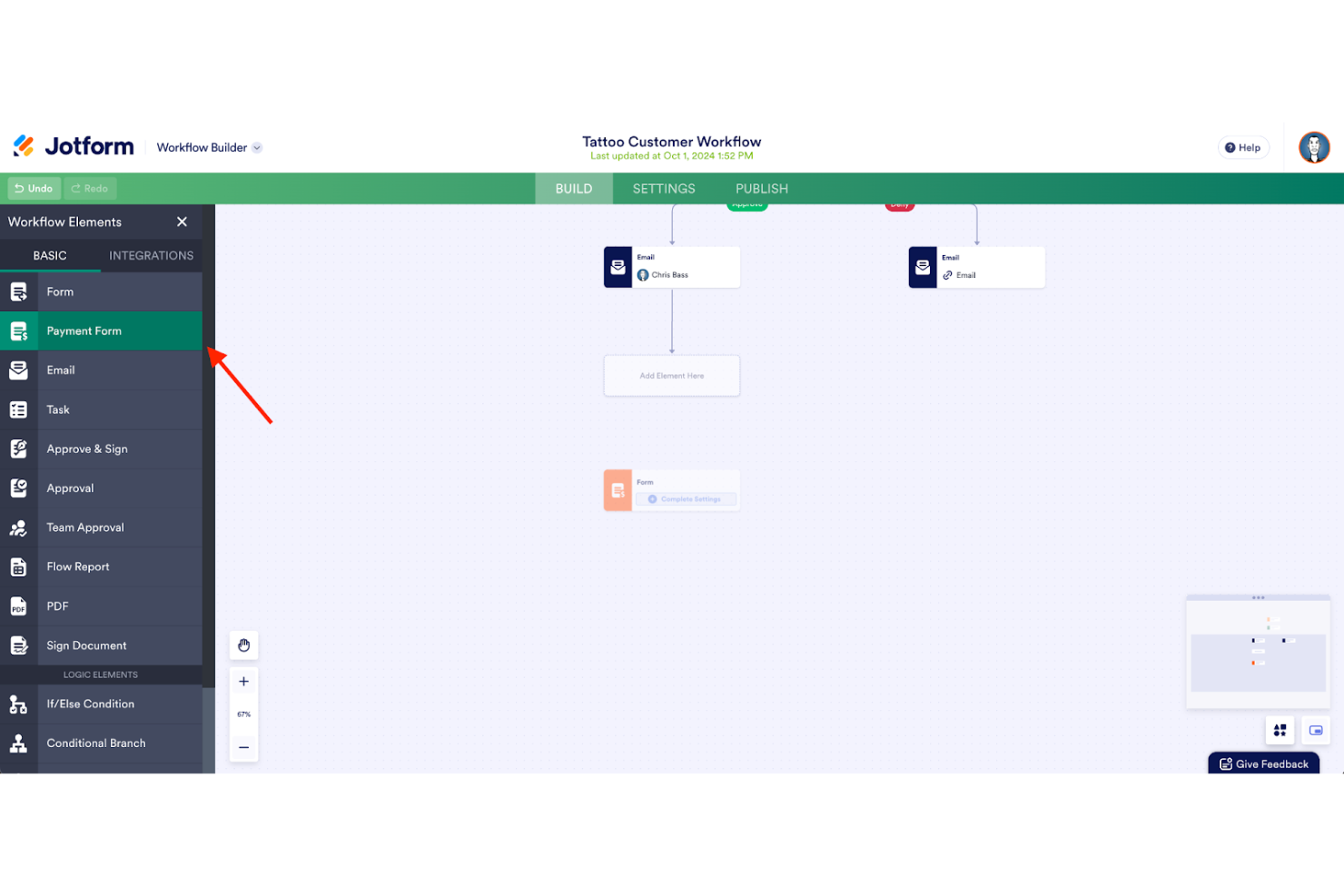
Jotform Workflows is a no-code automation tool designed to improve workflow management and streamline approval processes within organizations. It allows users to build customized workflows that automate tasks and enhance collaboration through an intuitive drag-and-drop interface.
Why I Picked Jotform Workflows
In my opinion, Jotform Workflows is standout option for workflow automation, primarily due to its intuitive no-code workflow builder. With this feature, you can design custom workflows with ease using a drag-and-drop interface, making it accessible for users without a technical background.
Additionally, I found Jotform Workflows' strong automation capabilities, including conditional logic, parallel processing, and automated approvals, highly valuable as they manage to effortlessly address diverse organizational needs such as employee onboarding and budget approvals.
Jotform Workflows Key Features
Jotform Workflows offers several other key features that make it a versatile tool for automating tasks.
- Conditional Logic: You can customize your workflows to perform different actions based on specific criteria, which allows for more dynamic and responsive task management.
- Task Assignment: This lets you easily assign tasks to team members and keep everyone informed and accountable within your workflow.
- E-Signature Collection: You can integrate e-signature capture into your workflows to facilitate document approvals and ensure secure sign-offs.
- Real-Time Monitoring: This lets you track the progress of workflows with live updates, so you can quickly identify and address any issues.
Jotform Workflows Integrations
Integrations include Microsoft Teams, Slack, Google Sheets, Zoom, Google Calendar, Zoho CRM, and Pipedrive. Jotform Workflows also works with Zapier to help you connect to thousands of other software options.
Pros and Cons
Pros:
- Flexible conditional logic and branching for dynamic workflows
- Parallel processing can handle multiple tasks simultaneously
- Automated email notifications to keep stakeholders informed
Cons:
- Customization post-form submission can be cumbersome
- Customization options for the visual interface could be more advanced
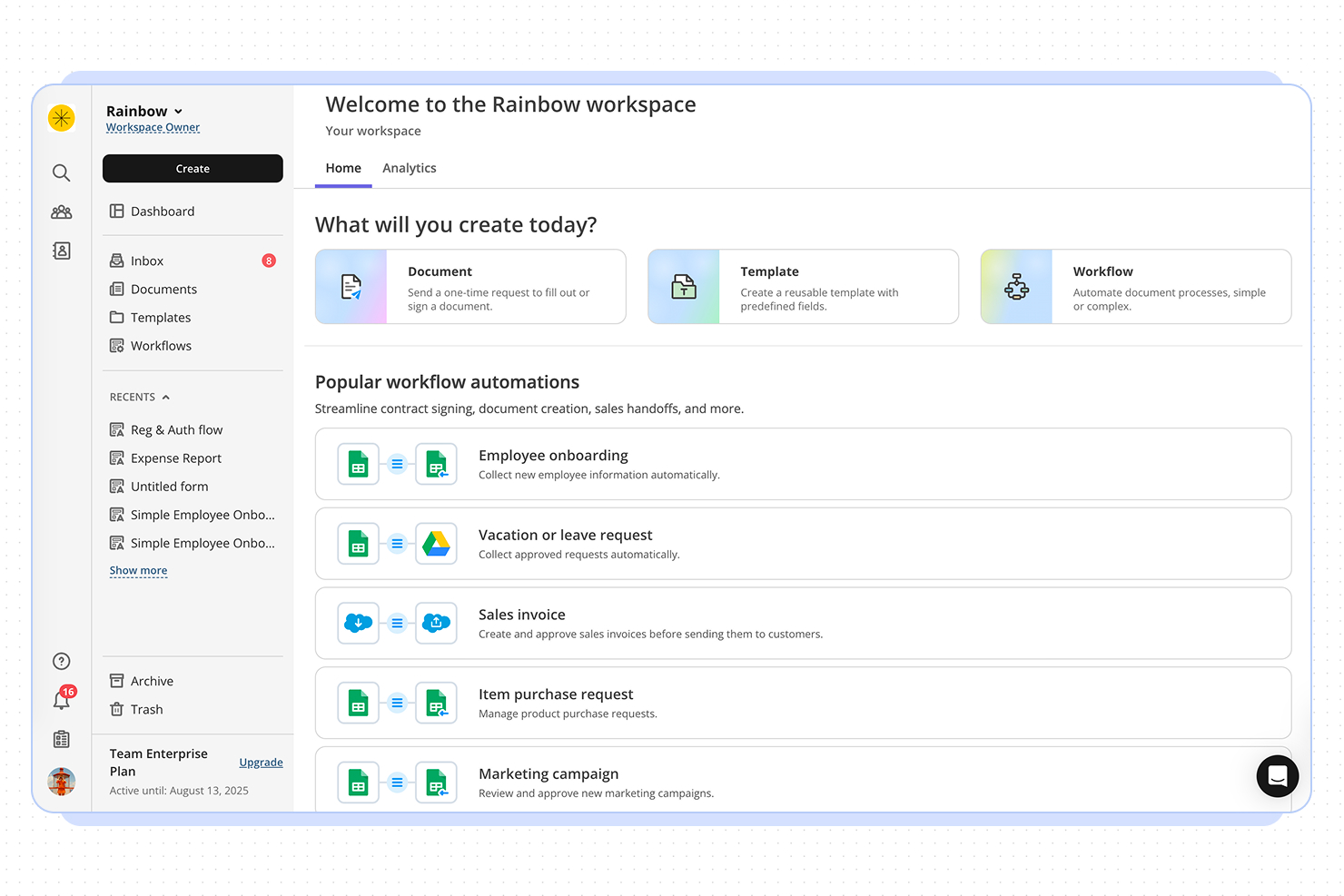
altaFlow offers workflow automation designed for organizations that need advanced document management and CRM integration. It’s a strong fit for teams in regulated industries or those handling complex approval processes. If your business relies on automating document workflows and syncing data across platforms, altaFlow addresses these needs with a focus on compliance and integration.
Who Is altaFlow Best For?
altaFlow is a good fit for mid-sized to large enterprises in regulated industries that need to automate document workflows and integrate tightly with CRM systems.
Why I Picked altaFlow
For teams that need advanced Salesforce document automation, altaFlow stands out in the workflow automation space. I picked it because it offers native document generation and automated workflow triggers directly within Salesforce, which reduces manual steps and keeps processes consistent. The platform also supports dynamic template management, letting users create, update, and distribute documents based on real-time CRM data. This focus on seamless document automation inside Salesforce makes altaFlow a strong choice for organizations that rely on accurate, timely document workflows.
altaFlow Key Features
Some other altaFlow features that support workflow automation include:
- Approval routing: Route documents and tasks to the right stakeholders for review and sign-off based on custom rules.
- Audit trails: Track every action and change within workflows to support compliance and transparency.
- Conditional workflow branching: Set up workflows that adapt dynamically based on data or user input.
- Role-based access controls: Define permissions and access levels for users to ensure sensitive information is only available to authorized team members.
altaFlow Integrations
Integrations include Salesforce, NetSuite, SharePoint, and HubSpot.
Pros and Cons
Pros:
- Custom workflow builder supports complex processes
- Automated document generation from Salesforce records
- Detailed audit trails for compliance tracking
Cons:
- Documentation and support resources are minimal
- No free-forever or trial plan available


Wrike is a proven work management platform that includes advanced workflow improvement features. The automation engine puts everyday business processes on autopilot, cutting out time-wasting busywork.
Why I Picked Wrike
Wrike is a great fit for scaling organizations because its automation engine makes it easier to manage growing workloads without adding manual effort. As your team expands, repetitive tasks like assigning work, changing task statuses, or sending notifications can become a time sink. Wrike’s rule-based automation lets you build “if-this-then-that” logic into your workflows to help you keep tasks moving even as volume increases.
I also like its AI-powered automation suggestions. As team activity increases, it gets harder to notice where processes are lagging or breaking down. Wrike monitors those patterns and recommends automation rules to improve speed and consistency—something especially valuable when you’re onboarding new team members or launching new projects frequently.
Wrike Key Features
In addition to its scalability, Wrike offers several other features for workflow automation.
- Customizable Workflows: You can tailor workflows to fit your specific processes and make sure automations align perfectly with your team's unique needs.
- Cross-Tagging and Status Updates: You can automate tasks such as cross-tagging and status updates, which minimizes the risk of missing important steps and helps speed up your projects.
- Time Tracking: This lets you keep tabs on how much time is spent on tasks and projects so you can manage resources effectively.
- Calendar Integration: You can sync your tasks and deadlines with popular calendar apps to keep your schedule organized and up-to-date.
Wrike Integrations
Integrations include over 400 cloud and on-premises apps, including CRM, email, chat, file storage, and business intelligence. If you can't find the tool you're looking for, you can build a custom integration using Wrike's API.
Pros and Cons
Pros:
- Automates approval processes
- Highly customizable workflows
- Comprehensive feature set for various project needs
Cons:
- Potential for notification overload if not configured correctly
- The platform takes time to learn
New Product Updates from Wrike

Wrike Adds Template Installation for Existing Spaces
Wrike adds template installation for existing Spaces with expanded configuration support and more customization options. This update helps teams reuse templates, standardize workspaces, and add workflows without creating new Spaces. For more information, visit Wrike’s official site.
 .
.
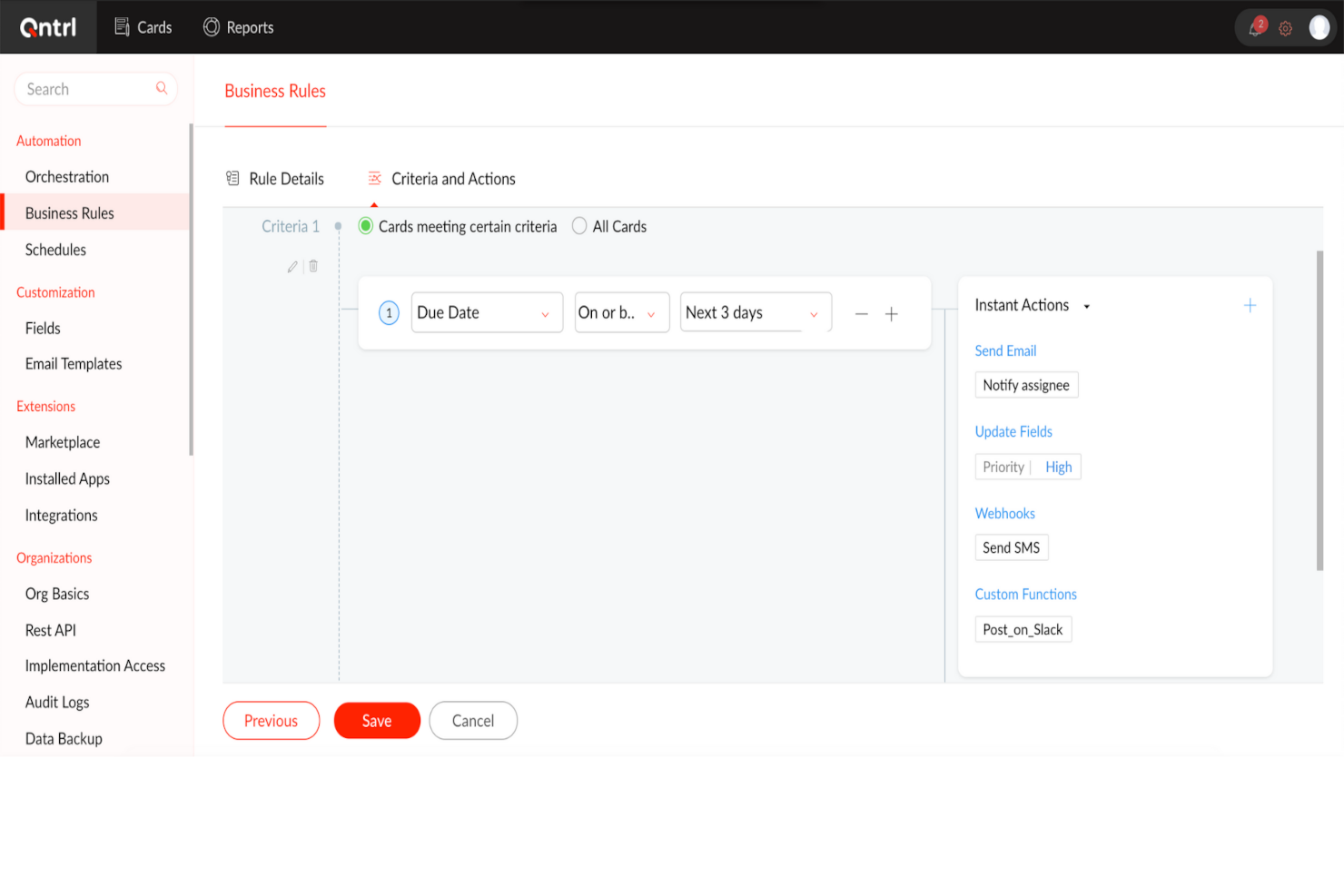
Qntrl is an advanced workflow orchestration software that improves productivity and efficiency in the workplace. At its core, it automates processes across different applications to reduce manual data entry and speed up workflows.
Why I Picked Qntrl
I chose Qntrl for its strength in managing cross-functional processes through features like Blueprint-based process modeling, form-based data capture, and role-based access controls that make sure the right people are involved at the right steps.
Its drag-and-drop workflow builder lets non-technical users quickly configure and launch end-to-end processes, while parallel transitions and stage-wise approvals allow multiple teams to collaborate simultaneously without bottlenecks. With built-in audit trails and customizable notifications, Qntrl keeps cross-departmental stakeholders informed and accountable throughout the workflow lifecycle.
Qntrl Key Features
Qntrl also offers a suite of other workflow automation features.
- Automatic Request Assignment: You can assign requests based on predefined hierarchies or dynamically through APIs to make sure tasks reach the right individuals without manual intervention.
- Post-Stage Automation: This lets you automatically trigger actions after certain stages, such as sending notifications or updating fields, to streamline follow-up tasks.
- Business Rules: You can set specific rules that dictate process behavior to maintain compliance and consistency across workflows.
- Document Generation: You can quickly create and share essential documents like purchase orders or invoices to reduce the time spent on paperwork.
Qntrl Integrations
Integrations include Salesforce, Dropbox, MS Teams, Harvest, Google Sheets, and Slack. You can also create as many custom integrations as you want using Webhooks and its API.
Pros and Cons
Pros:
- Employs robust security protocols
- Advanced automation, like conditional routing
- Extensive integration capabilities, with over 500 connections
Cons:
- More features than necessary for small teams
- Learning curve for more advanced features

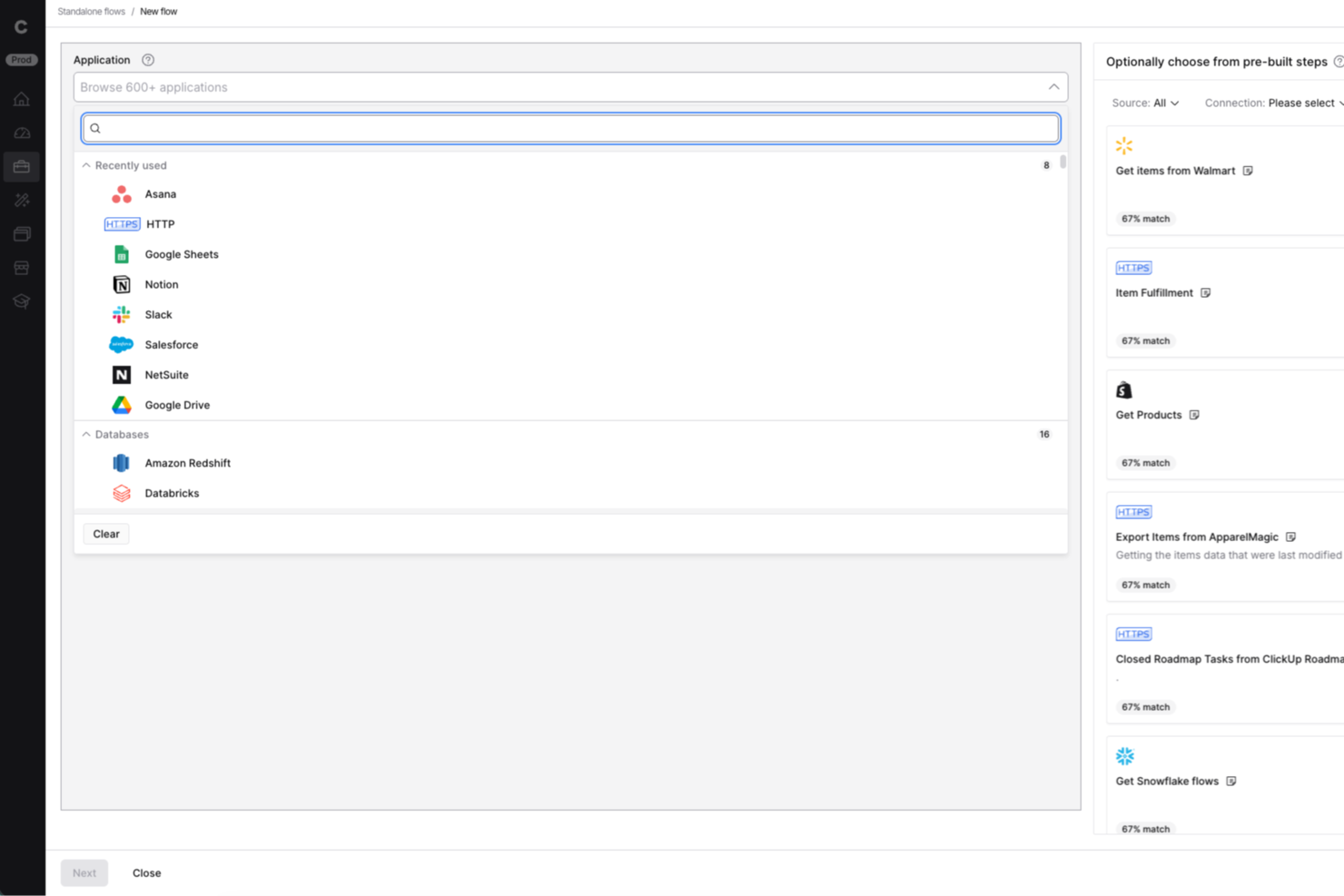
Celigo is an integration and automation platform built for IT teams and business operations leaders who need to connect cloud apps, automate workflows, and manage complex data flows across their organization.
Who Is Celigo Best For?
IT teams and operations leaders at mid-sized to large businesses who need to automate and orchestrate workflows across multiple cloud and on-premises systems.
Why I Picked Celigo
I picked Celigo as one of the best because its API management capabilities let my team build, monitor, and scale integrations with confidence. I use the platform’s API lifecycle tools to create, publish, and secure custom APIs for connecting internal and external systems. The built-in monitoring and analytics help us troubleshoot issues quickly and keep workflows running smoothly.
Celigo Key Features
- Visual flow builder: Design and automate workflows using a drag-and-drop interface.
- Prebuilt integration templates: Deploy ready-made connectors for popular SaaS and on-premises apps.
- Advanced error management: Track, resolve, and retry failed workflow steps from a centralized dashboard.
- Data transformation tools: Map, filter, and transform data between systems without custom code.
Celigo Integrations
Integrations include Salesforce, Microsoft Dynamics 365 Business Central, Oracle NetSuite, Walmart, SAP, Snowflake, Acumatica, Adobe, ADP, and 3PL Central.
Pros and Cons
Pros:
- Includes automated error handling and alerts
- Provides visual workflow builder for integrations
- Enables granular role-based access controls
Cons:
- Limited offline or on-premises deployment options
- Some connectors require additional configuration effort

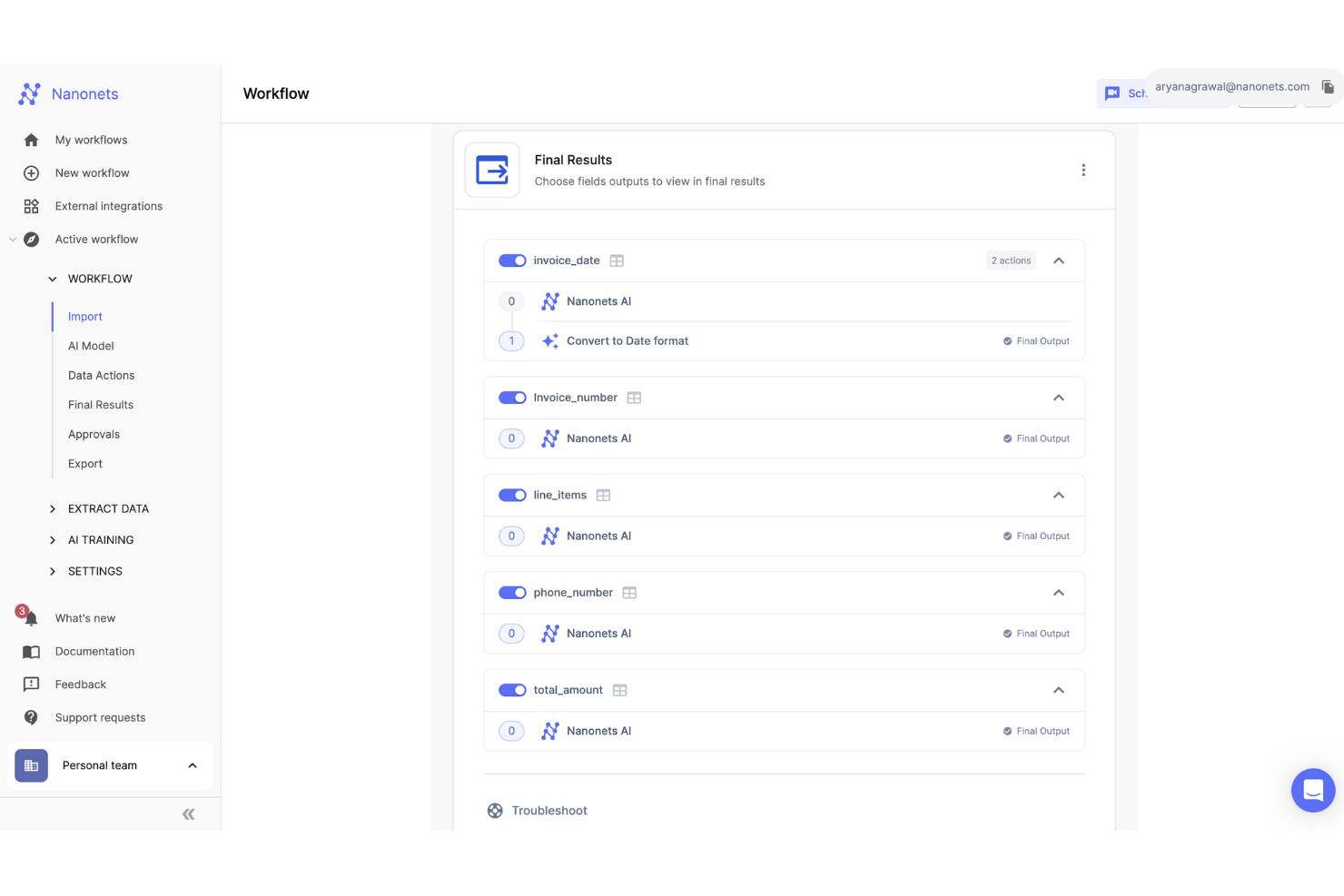
Nanonets is an AI-driven platform that automates the processing of documents and manages workflows across sectors like finance, healthcare, and logistics. It efficiently handles tasks such as data extraction, invoice processing, and accounts payable, minimizing manual labor and reducing processing times.
Why I Picked Nanonets
I chose Nanonets for its AI-driven capabilities that can automate complex workflows using natural language processing, allowing you to manage workflows that interact with various apps and data sources. The platform supports custom Language Learning Models (LLMs) for tailored responses and actions, enhancing workflow customization to meet specific business needs. This lets you design workflows that are automated and adaptive to unique business environments.
Additionally, Nanonets offers a human-in-the-loop feature for manual approvals, providing an extra layer of accuracy in automated workflows. It's also a no-code platform, so you can automate these workflows without coding expertise.
Nanonets Key Features
Nanonets also offers a variety of other features that make it appealing as a workflow automation tool.
- Advanced Optical Character Recognition: This feature lets you convert various document types into editable data, which streamlines document processing tasks.
- Automated Workflows: You can set up workflows that handle repetitive tasks, which frees your team up to focus on more strategic activities.
- Multiple File Upload Options: This lets you upload and process multiple documents simultaneously, which improves efficiency in handling bulk data.
- Data Extraction Capabilities: You can extract data accurately to reduce errors and make sure your workflows maintain high levels of precision.
Nanonets Integrations
Integrations include QuickBooks, Salesforce, Google Sheets, Dropbox, and Zapier.
Pros and Cons
Pros:
- Simple API for easy integration
- Compatible with multiple programming languages
- Data extraction features
Cons:
- Fewer customization options than other tools
- May not be suitable for more extensive machine learning projects with large datasets
Other Workflow Automation Software
Here are a few tools that did not make it to the top but are worth your consideration.
- Integrately
For an AI automation builder
- Jira
For agile project management
- Camunda Platform
For high-volume automation
- Kissflow Workflow
For non-technical users
- Next Matter
For complex workflows
- Adobe Workfront
For comprehensive project oversight
- Pneumatic Workflow
For templated workflows
- Boomi Flow
For low-code workflow automation
- Miro
For drag-and-drop workflows
- Creatio Studio
For enterprise workflow customization
- SysAid
For IT service management
- Hive
For beginners
- Bonsai Agency Software
For agency and consultancy workflows
- Kantata
For professional services
- StreamWork
For creative workflows
- Parabola.io
For automating data-heavy workflows
- DocuWare
For document management
- Make
For visual-first automation


Workflow Automation Software Selection Criteria
When selecting the best workflow automation software to include on this list, I considered common buyer needs and pain points like eliminating manual data entry and ensuring consistent processes across teams. I also used the following framework to keep my evaluation structured and fair:
Core Functionality (25% of total score)
To be considered for inclusion on this list, each solution had to fulfill these common use cases:
- Automating task assignments and approvals
- Triggering workflows based on predefined conditions
- Integrating with third-party apps and tools
- Providing workflow templates for common processes
- Offering visual workflow builders for easy setup
Additional Standout Features (25% of total score)
To help further narrow down the competition, I also looked for unique features, such as:
- AI-driven workflow optimization suggestions
- No-code automation for non-technical users
- Custom scripting for advanced process automation
- Built-in compliance and audit tracking
- Automated reporting and workflow analytics
Usability (10% of total score)
To get a sense of the usability of each system, I considered the following:
- Navigability of the interface and workflow builder
- Clarity of automation setup and execution steps
- Accessibility of pre-built automation templates
- Availability of drag-and-drop functionality
- Mobile-friendly access to workflows and approvals
Onboarding (10% of total score)
To evaluate the onboarding experience for each platform, I considered the following:
- Availability of interactive product tours and walkthroughs
- Inclusion of workflow templates for easy setup
- Access to live training sessions or webinars
- Quality of documentation and knowledge base resources
- Presence of in-app chatbots or guided assistance
Customer Support (10% of total score)
To assess each software provider’s customer support services, I considered the following:
- Availability of live chat, phone, and email support
- Responsiveness and resolution times for technical issues
- Access to a dedicated account manager for enterprise users
- Presence of a community forum for peer support
- Availability of multilingual support for global teams
Value For Money (10% of total score)
To evaluate the value for money of each platform, I considered the following:
- Pricing structure relative to feature depth
- Availability of free plans or trials for testing
- Scalability of pricing for different team sizes
- Inclusion of premium features at lower tiers
- Transparency of costs with no hidden fees
Customer Reviews (10% of total score)
To get a sense of overall customer satisfaction, I considered the following when reading customer reviews:
- Frequency of reported software bugs or downtime
- Ease of implementation and adoption by teams
- Overall satisfaction with customer support quality
- Perceived return on investment and time savings
- User feedback on feature requests and updates
How to Choose Workflow Automation Software
It’s easy to get bogged down in long feature lists and complex pricing structures. To help you stay focused as you work through your unique software selection process, here’s a checklist of factors to keep in mind:
| Factor | What to Consider |
|---|---|
| Scalability | Ensure the software can handle increasing workflows, users, and complexity as your business grows. Look for tiered pricing, enterprise-level features, and performance benchmarks to avoid outgrowing your system. |
| Integrations | Your automation tool should connect seamlessly with your existing software stack, including CRM, ERP, and communication tools like Slack or Microsoft Teams. Native integrations and API support are crucial. |
| Customizability | Choose a solution that lets you tailor workflows to your specific processes. Drag-and-drop builders, conditional logic, and script-based automation options can help you fine-tune automation to your team’s needs. |
| Ease of Use | A user-friendly interface with low-code or no-code options ensures your team can create and modify workflows without IT intervention. Look for a simple dashboard and intuitive setup. |
| Budget | Consider both upfront costs and long-term expenses like subscription fees, add-ons, and support charges. Some platforms charge per user, while others scale based on automation volume. |
| Security Safeguards | Your software should offer role-based access, data encryption, and compliance with standards like GDPR or SOC 2. Check audit logs and backup policies to protect sensitive workflow data. |
| AI & Automation Features | Look for AI-driven automation, predictive analytics, and smart triggers that improve efficiency. Features like automatic data extraction and intelligent decision-making can reduce manual work. |
| Support & Reliability | Evaluate customer support options, uptime guarantees, and community forums. A strong support system ensures smooth implementation and minimal disruptions when issues arise |
Workflow Automation Software Trends for 2025
In my research, I sourced countless product updates, press releases, and release logs from different workflow automation software vendors. Here are some of the emerging trends I’m keeping an eye on:
- AI-Powered Process Optimization: AI is now being used to analyze workflow data, identify inefficiencies, and suggest improvements. Some tools now auto-adjust task assignments based on workload patterns or predict delays before they happen.
- No-Code Workflow Builders: More intelligent process automation software is simplifying automation for non-technical users with drag-and-drop builders and workflow templates. This lets teams build complex automations without coding or IT help.
- Hyperautomation Strategies: Companies are blending workflow automation, robotic process automation (RPA), AI, and event-driven triggers to decrease manual work across business processes. This reduces human input in repetitive tasks like invoicing and onboarding.
- Governance and Compliance Controls: As automation expands across industries, stricter controls are being added for data security, auditing, and compliance. Organizations can now enforce role-based permissions, maintain detailed activity logs, and automate compliance reporting.
- Real-Time Workflow Monitoring: Businesses are demanding better visibility into automated processes with live dashboards, alerts, and predictive analytics. Real-time monitoring helps teams catch workflow failures, track process efficiency, and make quick adjustments to avoid bottlenecks.
What Is Workflow Automation Software?
Workflow automation software is a tool that automates repetitive tasks and multi-step processes across apps, teams, and departments.
These platforms help project managers reduce manual effort by automating approvals, notifications, assignments, and data movement between tools. They’re used by teams in operations, marketing, IT, HR, and more to streamline everyday workflows, reduce delays, and improve process accuracy. Whether you’re routing requests, scheduling tasks, or syncing data between platforms, workflow automation software removes friction from cross-functional work.
Types of Workflow Automation
Workflow automation is useful in any industry that benefits from streamlined processes and greater efficiency. Key workflow automation types include:
- Marketing Workflow Automation: Content workflow software automates tasks like email campaigns, social media posting, and lead nurturing.
- Sales Workflow Automation: Business process automation software helps automate lead management, contract approvals, and sales pipeline tracking.
- Customer Service Workflow Automation: Process automation software automates ticket assignment, customer inquiries, and feedback collection.
- HR Workflow Automation: Task automation tools handle employee onboarding, performance reviews, and compliance tasks.
- Finance Workflow Automation: Automates expense approvals, invoicing, and payroll with business process automation tools.
- IT Workflow Automation: Streamlines system updates, backup processes, and service requests through IT process automation tools.
- Supply Chain Workflow Automation: Helps automate inventory management, order processing, and vendor communications.
- Manufacturing Workflow Automation: A process automation platform streamlines production scheduling, quality checks, and maintenance tracking.
Features of Workflow Automation Software
When selecting workflow automation software, keep an eye out for these key features:
- Drag-and-drop workflow builder: You can visually design and adjust processes without coding by dragging elements onto a canvas. This makes creating, tweaking, and understanding workflows quick and intuitive.
- Integration capabilities: You can connect apps and services you're already using (e.g. CRMs, emails, databases, and cloud storage) to the system. This reduces copying and pasting and manual information transfer between tools.
- Conditional logic: You can set rules so the software automatically routes tasks or triggers actions based on data, status, or criteria you define. It helps you avoid repetitive manual decisions and keeps processes running smoothly.
- Task assignment and notifications: This lets you assign tasks to the right team members and set up automated reminders and notifications so everyone stays on track and is kept in the loop as workflows progress.
- Audit trails and reporting: You can track every action and change within your workflows. This is useful when you need to troubleshoot, review productivity, or show compliance.
- Customizable templates: This lets you start with pre-made workflow templates that you can adapt to fit your needs, and helps you get up and running faster.
- User permissions and access control: You can set different access levels so only the right people can see or edit specific workflows or data.
- Mobile access: This lets you manage and monitor workflows on the go so you can approve requests, reassign tasks, or get updates anytime, anywhere.
Common Workflow Automation Software AI Features
Beyond the standard workflow automation software features listed above, many of these solutions are incorporating AI features like:
- Predictive task assignment: This AI tool can automatically suggest or assign tasks based on team habits, workloads, and deadlines, which removes guesswork.
- Automated data extraction: This AI feature can scan emails, documents, or images, pull out key information, and send it to the right place to reduce manual data entry and mistakes.
- Process optimization recommendations: Using data from past activity, this AI feature can identify bottlenecks, inefficiencies, or repeated errors, and give you targeted suggestions to speed things up.
- Natural language processing: You can communicate with the AI features using everyday language, which makes automation approachable for all team members.
- Anomaly detection: AI can continuously monitor workflow activity, flag missed deadlines or irregular patterns, and help you catch problems before they impact productivity.
Some tools are much more flexible and allow for deeper customization, especially with automation and formulas. However, others are easier to use and have a more intuitive interface.

Benefits of Workflow Automation Software
Implementing workflow automation software can provide several benefits for your team and your business. Here are a few you can look forward to:
- Faster task completion: Automated workflows move tasks through each step without delays, reducing bottlenecks and wait times.
- Fewer errors: Automation eliminates manual data entry and handoffs, which reduces the risk of mistakes and inconsistencies.
- Better process visibility: Workflow diagrams and tracking tools let you see where tasks stand, making it easier to spot inefficiencies.
- Improved accountability: Audit logs and role-based access ensure tasks are handled by the right people and actions are fully recorded.
- More consistent outcomes: Standardized workflows enforce rules and best practices, so processes run the same way every time.
- Less time spent on approvals: Automated approval flows send requests to the right people instantly and trigger the next steps once approved.
- Easier scalability: Automated processes adapt as your team grows, handling more work without needing more manual effort. However, keep in mind that if you want your solution to scale from automating processes within a project to interdependent workflows across multiple systems, you need a different option. Workflow orchestration tools can help you deal with more complex automations across systems and teams.
Costs and Pricing of Workflow Automation Software
Selecting workflow automation software requires an understanding of the various pricing models and plans available. Costs vary based on features, team size, add-ons, and more. The table below summarizes common plans, their average prices, and typical features included in workflow automation software solutions:
Plan Comparison Table For Workflow Automation Software
| Plan Name | Price (per user/month) | Features |
|---|---|---|
| Free | $0 | Basic automation, limited users and workflows, basic integrations |
| Basic | $10 - $20 | Task automation, simple workflow customization, basic reporting, limited users and workflows |
| Standard | $20 - $50 | Advanced automation, workflow customization, reporting and analytics, integrations, multiple users |
| Premium | $50 - $100 | Advanced workflow automation features, customizable workflows, advanced reporting, unlimited users |
Workflow Automation Software Frequently Asked Questions
Find answers to common questions about this topic.
How do I automate my workflows?
To automate project workflows, start by creating a workflow diagram that clearly outlines each step, from task initiation to completion. Identify repetitive actions—like task assignments, status updates, or document sharing—that could benefit from automation.
Then, choose a platform that supports automation features. Set up rules like “if a task is marked complete, notify the next team member” or “if a form is submitted, trigger the approval workflow.” Automating an approval workflow is especially helpful for reducing delays and keeping things moving. Start small, test thoroughly, and adjust as needed.
How can workflow automation software integrate with existing CRM systems?
Workflow automation tools often offer robust integration capabilities with CRM systems to streamline processes and enhance data flow between platforms. These integrations typically allow for the automation of tasks such as data entry, lead tracking, and customer communication to ensure that information remains up-to-date across systems.
Can workflow automation software be customized for unique business processes?
Yes, many workflow automation tools are designed with customization in mind to cater to the specific needs of different business processes. This flexibility allows organizations to tailor the software’s functionalities to match their operational requirements, from custom workflows and forms to specific automation rules.
How scalable are these solutions as a business grows?
Workflow automation solutions are generally built with scalability in mind, enabling businesses to adapt and grow without outgrowing the software itself. These platforms are designed to handle increasing amounts of work and more complex processes as a company expands. The ability to add users, integrate with more systems, and automate a broader range of tasks allows these tools to grow alongside your business, ensuring that your investment remains viable over the long term.
How do workflow automation tools impact project deadlines and resource allocation?
Workflow automation tools typically speed up repetitive tasks, reduce bottlenecks, and help distribute work more evenly across your team. By streamlining approvals, handoffs, and notifications, you’re less likely to miss deadlines. Resource planning features can also help you monitor workloads and prevent over- or under-utilization.
How do I get my team to adopt new workflow automation tools?
Start with clear communication on benefits and provide hands-on training. Involve key team members in selecting and testing the software so they’re more invested. Use step-by-step onboarding and offer ongoing support. Highlight quick wins and show how automation reduces tedious work, making their jobs easier.
What's Next?
Make sure you subscribe to the Digital Project Manager newsletter. You’ll get fascinating insights into this fast-moving world, together with the information you need to stay on top of your professional game.