

10 Best Trello Alternatives In 2026 (Free & Paid Options)

10 Best Trello Alternatives Shortlist


Trello is a popular project management tool, but it’s not the perfect fit for every team. Whether you’ve outgrown its simple boards, need more robust reporting, or want deeper integrations, there are plenty of Trello alternatives that offer powerful features and flexible workflows to better support your projects.
I’ve tested and reviewed top project management platforms with Trello users in mind—focusing on usability, team collaboration, customization, and value. Whether you're managing agile workflows, client projects, or internal teams, there's a tool here that can take your productivity to the next level.
What is Trello?
Trello is a visual project management tool that helps individuals and teams organize tasks, track progress, and collaborate in real time.
Using a board-based system with lists and cards, Trello makes it easy to plan projects, assign tasks, and monitor workflows. It’s popular among project managers, marketers, and developers for its flexibility, ease of use, and ability to streamline team coordination.
Why Use a Trello Alternative
You might be looking for an alternative to Trello if you:
- Need advanced reporting and analytics, such as for detailed project tracking and insights.
- Require better integration options.
- Need highly customizable workflows and features.
- Need consistent access without an internet connection to your project management software.
- Require comprehensive security features.
Alternatives to Trello often provide features that address these limitations. They offer advanced reporting tools for in-depth analytics, extensive integration options for a broader range of software, and greater customization to fit unique workflows.
Enhanced offline functionality ensures access to project information without internet, and improved security features provide better protection for sensitive data. These alternatives cater to users seeking more comprehensive solutions that more closely align with their specific project management and collaboration needs.
Why You Can Trust Us
We’ve been testing and reviewing project management software since 2012. As project managers ourselves, we know how critical and difficult it is to make the right decision when selecting software.
We invest in deep research to help our audience make better software purchasing decisions. We’ve tested more than 2,000 tools for different project management use cases and written over 1,000 comprehensive software reviews. Learn how we stay transparent & our software review methodology.
Best Trello Alternatives Comparison Chart
Here is a table where you can compare all the alternatives we just covered in the overviews.
| Tool | Best For | Trial Info | Price | ||
|---|---|---|---|---|---|
| 1 | Best AI-powered project insights | 14-day free trial | From $9/user/month (billed annually) | Website | |
| 2 | Best Trello alternative for resource and client management | 14-day free trial + free demo available | From $10/user/month (billed annually) | Website | |
| 3 | Best free plan for a Trello alternative | Free plan available | From $7/user/month (billed annually) | Website | |
| 4 | Best personalized onboarding and training | 14-day free trial + free demo available | From $8/user/month (billed annually) | Website | |
| 5 | Best price for freelancers and small teams | 15-day free trial + free plan + free demo available | From $4/user/month (billed annually) | Website | |
| 6 | Best for visual project management | 14-day free trial + free plan available | From $6/user/month | Website | |
| 7 | Best for automation capabilities | Free trial + free plan + free demo available | From $13/user/month (billed annually) | Website | |
| 8 | Best combination with a full project management suite | 30-day free trial + free demo available | From $72/month | Website | |
| 9 | Best cross-portfolio Kanban board | 30 days free trial | From $10/user/month | Website | |
| 10 | Best for development teams | Free plan + 14-day free trial + free demo available | From $8.50/user/month (billed annually) | Website |
-

Celoxis
Visit WebsiteThis is an aggregated rating for this tool including ratings from Crozdesk users and ratings from other sites.4.4 -
Smartsheet
Visit WebsiteThis is an aggregated rating for this tool including ratings from Crozdesk users and ratings from other sites.4.5 -
Accelo
Visit WebsiteThis is an aggregated rating for this tool including ratings from Crozdesk users and ratings from other sites.4.4




Best Trello Alternative Reviews
Here are a few of the best Trello alternatives and a description of what makes them special.

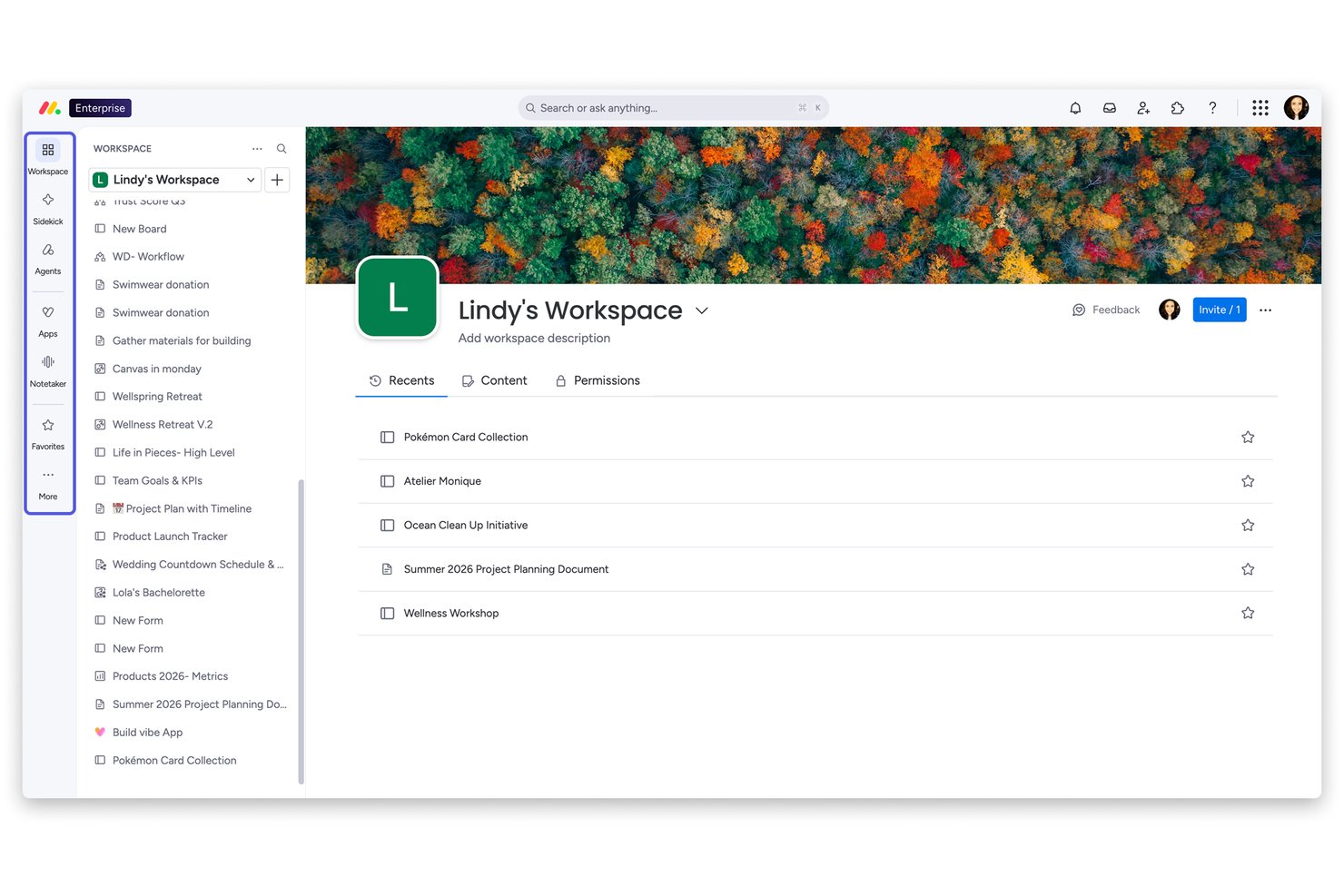
monday AI Workspace is a flexible project management platform built for teams that have outgrown simple Kanban tools and need multi-view project planning, cross-functional collaboration, and AI-driven automation in one place.
Who Is monday AI Workspace Best For?
It's a strong fit for mid-sized to large teams where project managers and PMO leads need portfolio-level visibility across multiple workstreams.
Why monday AI Workspace Is a Good Best Trello Alternatives (Free & Paid Options)
I picked monday AI Workspace as one of the best because its AI layer does something Trello simply can't: actively monitor your projects and surface risks before they derail timelines. The Project Analyzer flags bottlenecks in real time, while AI Blocks automate repetitive work like categorizing tasks and summarizing updates across boards. I also appreciate how live dashboards pull from multiple projects simultaneously, giving full portfolio visibility without manual reporting.
monday AI Workspace Key Features
- Workload view: See team capacity at a glance to balance assignments and avoid overloading anyone.
- Gantt and timeline views: Plan projects visually with drag-and-drop timelines and critical path tracking.
- Docs and whiteboards: Collaborate on documents and brainstorm with integrated whiteboard tools right in your workspace.
- Native time tracking: Log time on tasks and generate reports for billable hours or productivity reviews.
monday AI Workspace Integrations
monday AI Workspace offers hundreds of native integrations, including Slack, Google Workspace, Microsoft 365, Salesforce, HubSpot, Jira, GitHub, Zoom, Dropbox, and Zendesk. It also supports Zapier and provides an API for custom integrations.
Pros and Cons
Pros:
- More project views than Trello offers
- Portfolio dashboards across multiple projects simultaneously
- AI-powered project risk detection built in
Cons:
- Can feel overly complex for small teams
- Automation limits hit quickly on lower tiers
New Product Updates from monday AI Workspace
monday AI Workspace Adds Human Approval Routing
monday AI Workspace adds a human-in-the-loop approval block to AI Workflows, sending approval requests and routing workflow paths based on responses. For more information, visit monday AI Workspace's official site.
 .
.
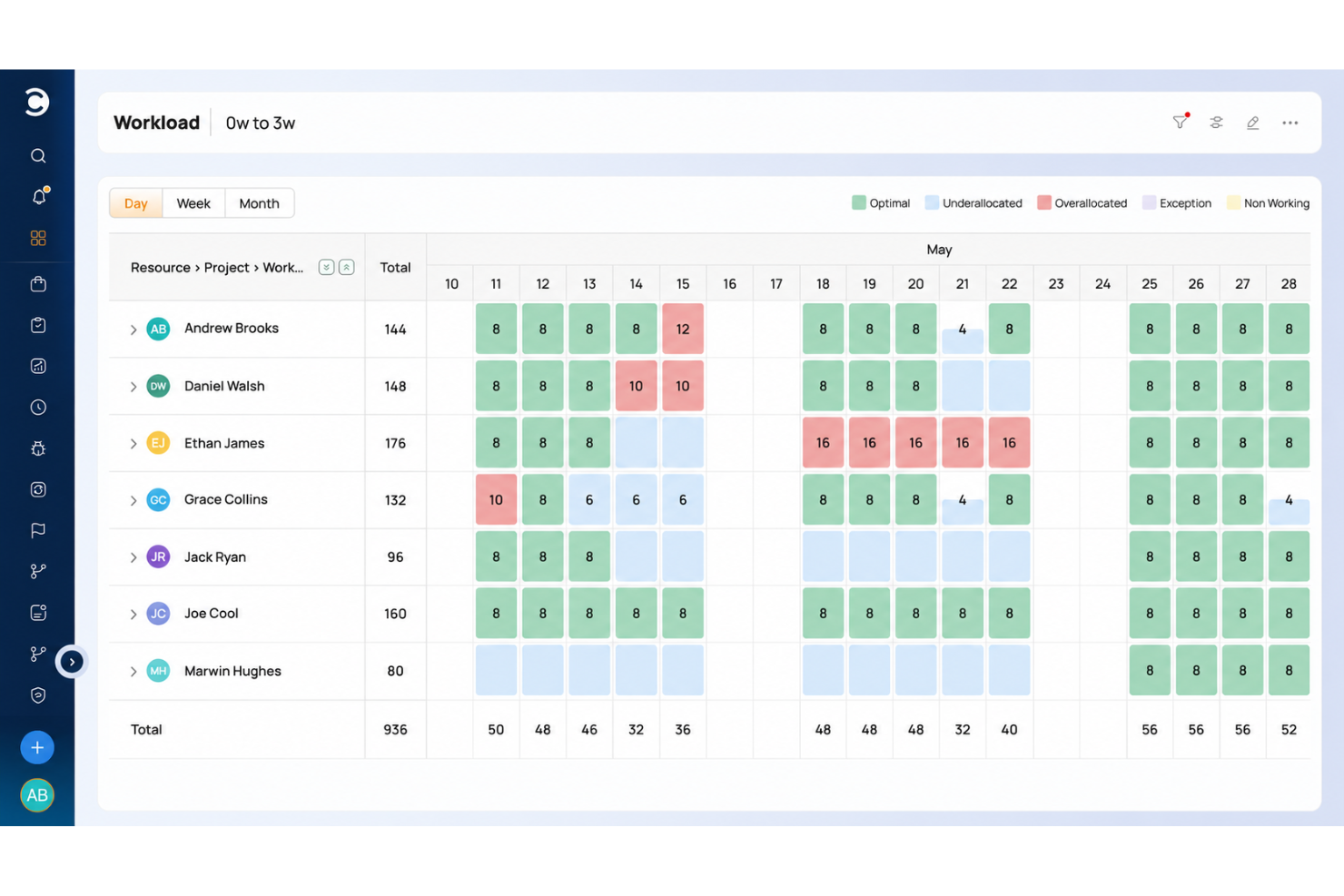
Why Celoxis is a great Trello alternative
Celoxis is an all-in-one project portfolio management (PPM) solution. It offers a comprehensive suite of project management features, but it differs from Trello because of its built in resource and client management tools. You can assign work based on employee capacity and other factors. You can also collaborate with clients using the client portals, online discussions, and shareable calendar. The software also tracks time and expenses related to each project, helping you keep clients happy and in the loop.

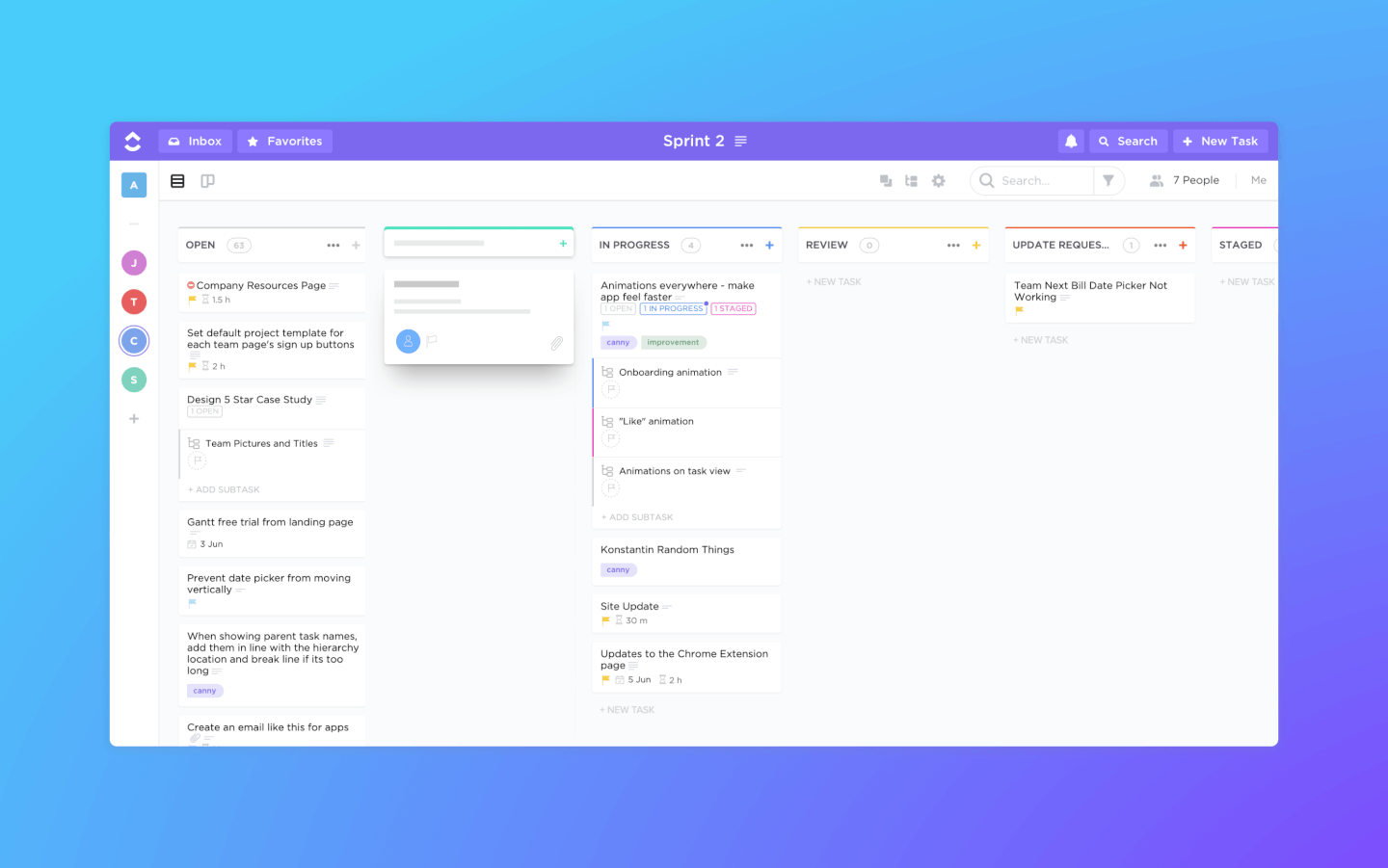
ClickUp is a project management software and Kanban tool with powerful features for managing and completing all your team's projects in one platform. Users can plan projects, schedule tasks, and manage resources in a centralized workspace on Kanban boards, as well as calendars, Gantt charts, timelines, and more.
Task management features include task checklists, subtasks, and task templates, as well as the ability to filter, sort, search for, easily reorder, and view tasks in the manner most convenient for the team. Users can also create Gantt charts, calendars, and timelines to visualize tasks.
ClickUp also includes features for creating, sharing, and collaborative editing for Wikis and documents. Users can comment on documents and tasks, assign comments, and chat with other team members for increased communication and collaboration. Reporting features include the ability to create custom dashboards, as well as six built-in report types for team reporting.
ClickUp offers native integrations with Slack, G Suite, Dropbox, and many more tools, as well as over 1,000+ integrations through Zapier.
ClickUp's free plan is robust and includes all primary features. The unlimited plan starts at $5 a month per user and offers additional functionality.
New Product Updates from ClickUp

ClickUp Introduces Brain² Company AI
ClickUp has introduced Brain², a self-improving company AI that routes to the best models and can complete work such as websites, slides, and project management tasks. For more information, visit ClickUp's official site.
 .
.
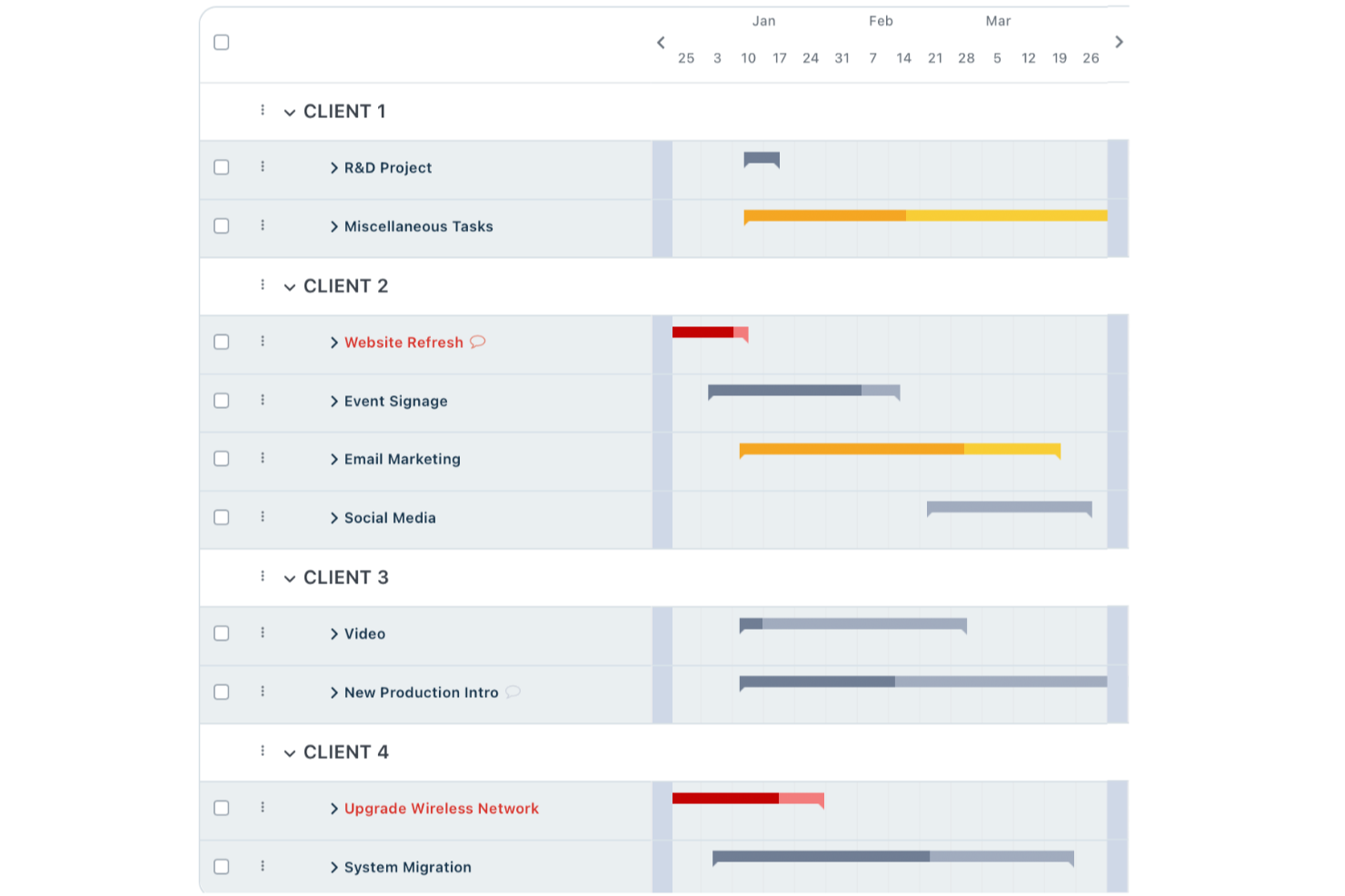
Workzone is a project management platform built for teams who need more structure and control than basic kanban boards provide. It’s a great fit for teams in marketing, operations, or professional services looking to manage complex projects, track progress, and improve cross-team visibility.
Who Is Workzone Best For?
Mid-sized companies in marketing, operations, or creative teams needing project structure and dedicated onboarding support.
Why Workzone Is a Good Trello Alternatives Free Paid Options
I picked Workzone because it goes well beyond what Trello offers teams that need real onboarding support. When my team started using it, we had access to a dedicated onboarding specialist who walked us through setup, workflows, and best practices for our specific use case. I appreciate that this isn't a one-time session—Workzone provides ongoing training resources so new team members can get up to speed without derailing the rest of the team. For teams switching from Trello, that kind of structured support makes adoption far less painful.
Workzone Key Features
- Project request forms: Submit and track incoming work requests through a standardized intake form tied directly to your project pipeline.
- Creative proofing tools: Review and mark up creative assets in real time, with feedback centralized within the task so revision rounds stay organized.
- Project templates: Build reusable project templates to launch consistent workflows without rebuilding the same structure from scratch each time.
- Workload management: View team capacity across active tasks and projects to spot resource conflicts before they affect delivery timelines.
Workzone Integrations
Workzone offers native integrations with Slack, Microsoft Teams, Dropbox, Box, and Google Drive, and provides an API for custom integrations.
Pros and Cons
Pros:
- Strong portfolio and resource management tools
- Detailed project and task reporting options
- Personalized onboarding sessions for new teams
Cons:
- Interface feels dated compared to newer tools
- No free tier for small teams
New Product Updates from Workzone

Workzone Adds Forecasts to Project Baselines
Workzone adds Forecasts to Project Baselines for Enterprise users, comparing baseline snapshots with current project schedules. The feature helps teams anticipate project outcomes and identify potential scope, schedule, or cost overruns earlier. For more information, visit Workzone’s official site.
 .
.

Zoho Projects is an online project management tool tailored for teams and freelancers to plan, track, and collaborate on projects effectively. It provides an affordable solution for managing tasks, timelines, and team workflows.
Why Zoho Projects is a good Trello alternative: Zoho Projects includes time tracking features that allow your team to monitor work hours and ensure tasks stay on schedule and within budget. Furthermore, the tool's detailed project status reports give you a clear overview of progress, helping you identify delays and optimize workflows. The tool also provides task dependencies that can help your team handle complex project structures more efficiently.
Zoho Projects Standout Features & Integrations:
Features include milestone tracking, which ensures your team stays aligned with project goals and deadlines. The issue tracking module also allows you to log and address problems, improving project delivery. Additionally, time logging is integrated directly into task workflows to simplify the process of tracking hours worked on specific tasks.
Integrations: Being part of the Zoho's ecosystem allows Projects to connect to several of Zoho's own services such as Zoho Books, Zoho CRM and Zoho's finance suite. The new Zoho marketplace allows 3rd party integrations as well. Integrations via Zapier and Zoho Flow are also supported.
Pros and Cons
Pros:
- Affordable for freelancers and small teams
- Integrates well with other Zoho apps and tools
- Includes Gantt charts for timeline adjustments
Cons:
- Dashboard customization is limited in certain areas
- Customizing reports can take extra time
New Product Updates from Zoho Projects

Zoho Projects Adds Time Log Grid View for Faster Tracking
Zoho Projects adds Time Log Grid View, a unified interactive grid for logging and reviewing hours across tasks and issues, helping teams enter time faster and identify work patterns more easily. For more information, visit Zoho Projects’ official site.
 .
.
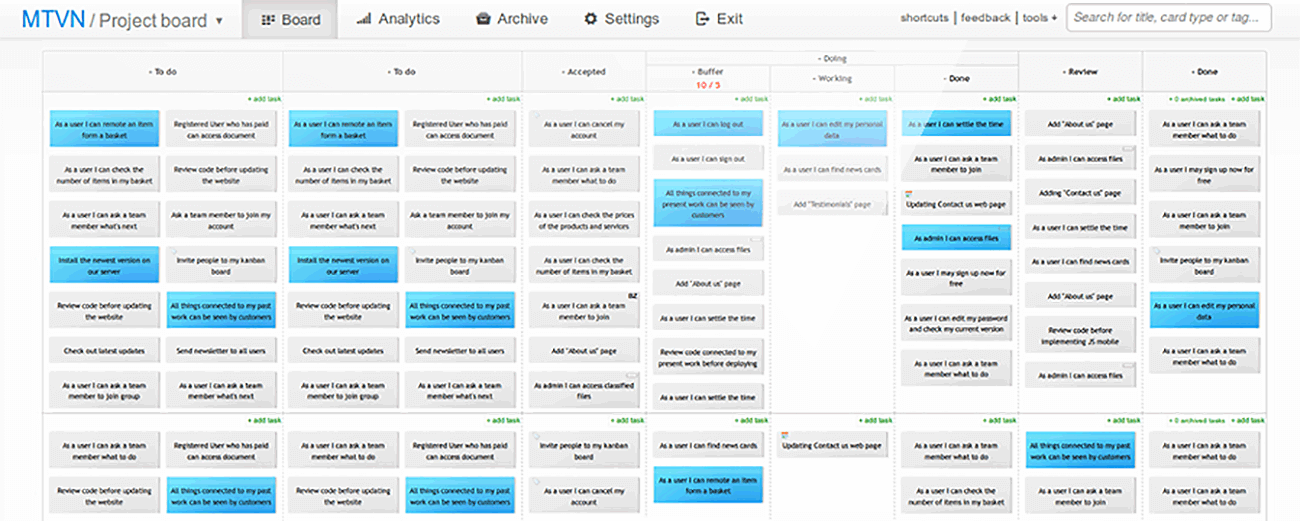
Kanban Tool is a project management platform that helps teams visualize workflows, track progress, and improve productivity. It is ideal for businesses seeking a simple yet effective way to manage tasks and enhance team collaboration.
Why Kanban Tool is a good Trello alternative: Kanban Tool excels in offering intuitive visual boards that simplify task organization and progress tracking. Its time tracking feature helps your team monitor productivity directly from the task board. Additionally, its analytics tools provide actionable insights into team performance and workflow bottlenecks. The platform is also easy to customize, which makes it particularly suitable for teams with unique project requirements.
Kanban Tool Standout Features & Integrations:
Features include a built-in calendar view that provides a clear timeline of tasks and deadlines to help your team plan effectively. The WIP (Work in Progress) limits feature also ensures your team stays focused by preventing task overload on any workflow stage. Additionally, the offline access capability allows your team to update boards even without an internet connection, ensuring work continuity.
Integrations include Slack, Zapier, Dropbox, Google Drive, Microsoft Teams, Jira, GitHub, Trello, Asana, and Salesforce.
Pros and Cons
Pros:
- Suitable for both small teams and large organizations
- Supports task automation to reduce manual work
- Offers swimlanes for detailed task organization
Cons:
- Less flexibility for detailed project portfolio management
- Reporting tools require initial setup and configuration

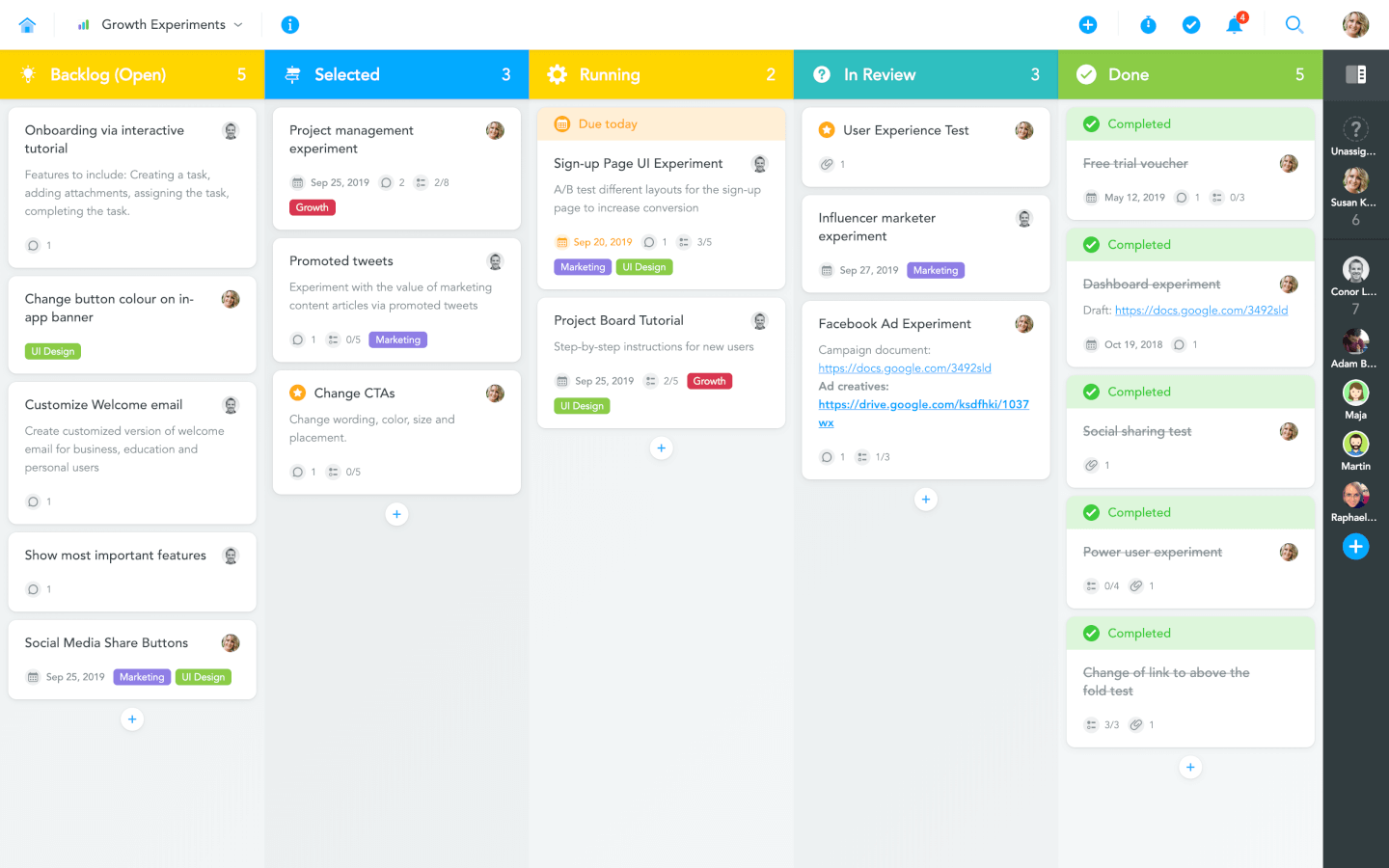
MeisterTask is a project management tool designed to help teams automate workflows and organize tasks effectively. It caters to teams looking for a streamlined approach to managing projects with minimal manual intervention.
Why MeisterTask is a good Trello alternative: MeisterTask simplifies project management with automation capabilities that reduce repetitive manual tasks. Its fully customizable Kanban boards allow your team to tailor workflows to match specific project requirements. Additionally, its progress tracking widgets provide real-time updates on project status, keeping everyone aligned.
MeisterTask Standout Features & Integrations:
Features include role-based permissions that allow your team to control access to tasks and projects for better security and organization. The agenda view can help users manage personal priorities by consolidating tasks from multiple projects in one place. MeisterTask also provides in-task checklists to break down complex tasks into smaller, actionable steps for improved clarity and execution.
Integrations include Slack, Google Drive, Dropbox, Microsoft Teams, GitHub, Zapier, Salesforce, Asana, Trello, and Outlook.
Pros and Cons
Pros:
- Simplifies task creation with templates and automations
- Offers built-in time tracking for monitoring productivity
- Includes task relationships to manage project dependencies
Cons:
- Task relationships may be complex for beginners
- Not ideal for teams using traditional methodologies


Breeze is a project management tool that helps teams track tasks, manage workflows, and oversee projects efficiently. It is ideal for organizations looking for a comprehensive platform to handle all aspects of project management.
Why Breeze is a good Trello alternative: Breeze combines task management with features like time tracking and resource allocation to give your team more control over projects. Its visual boards help you organize workflows and ensure transparency across tasks. The platform also includes built-in reporting tools to help your team analyze performance and make informed decisions. Additionally, Breeze supports project timelines and budgeting, which makes it a suitable tool for complex and multi-faceted projects.
Breeze Standout Features & Integrations:
Features include advanced project budgeting tools that let your team plan and monitor financial resources. The workload tracking feature additionally ensures that team members aren't overloaded and resources are balanced. Breeze also offers a centralized file management system to keep all your project documents accessible in one place.
Integrations include Slack, Trello, Google Drive, Dropbox, Microsoft Teams, GitHub, Zapier, Salesforce, Asana, and QuickBooks.
Pros and Cons
Pros:
- Provides visual project overviews with Kanban boards
- Enhances collaboration with shared document management
- Supports recurring tasks for consistent workflows
Cons:
- Not ideal for teams without budget management needs
- Limited pre-built templates for quick setup


Kanban Zone is a project management tool designed for teams and organizations managing multiple projects across portfolios. It provides visual task tracking to improve workflow efficiency and team collaboration.
Why Kanban Zone is a good Trello alternative: Kanban Zone offers highly customizable Kanban boards that allow your team to track tasks and projects across multiple portfolios. Its card hierarchy feature also enables you to break down complex projects into smaller tasks, making them easier to manage. Furthermore, with flexible board layouts, you can tailor workflows to fit the needs of different teams and projects.
Kanban Zone Standout Features & Integrations:
Features include a dependency mapping tool that helps your team identify and resolve task dependencies to avoid delays. The swimlane functionality lets you categorize tasks by priority, team, or project stage for better visibility. Moreover, real-time collaboration features ensure that updates and changes are instantly reflected across all boards for team alignment.
Integrations include Jira, Slack, Google Drive, Microsoft Teams, GitHub, Trello, Dropbox, Salesforce, Asana, and Zapier.
Pros and Cons
Pros:
- Handles multi-team workflows effectively
- Enables real-time updates for instant collaboration
- Supports highly customizable board layouts
Cons:
- May feel excessive for single-team projects
- Requires time to customize and configure boards


Shortcut is a project management tool designed for development teams, offering a way to plan, track, and manage work efficiently. Its platform is built around stories, epics, and milestones, giving your team a structured way to break down tasks and manage progress in real-time.
While both tools let you create boards and cards to track work, Shortcut’s unique focus on development processes gives it an edge. Features like epics, which allow you to manage larger initiatives, and stories, which break down tasks into smaller pieces, are integrated into its workflow.
Another feature that sets Shortcut apart is its iteration tracking. While Trello can be used for basic sprint management through its Kanban boards, Shortcut goes further by offering specific tools for agile teams. You can create sprints, assign tasks, and view detailed reports on how your team is performing over multiple iterations. Shortcut also provides custom workflows that allow you to tailor processes according to your team’s needs.
Shortcut offers various integrations, including Slack, GitHub, GitLab, Figma, Codestream, Bitbucket, Notion, Loom, Dailybot, Plecto, LinearB, Lambda Test, Testlodge, Google Calendar, Sentry, FireHydrant, and Vanta.
New Product Updates from Shortcut
Shortcut Introduces SLA Alerts for Workflow Tracking
Shortcut introduces SLA Alerts within Stories, currently available in early access. This update enables automatic deadlines and early breach warnings to help teams stay on top of high-priority work. For more information, visit Shortcut’s official site.
 .
.Other Trello Alternative Tools
Here’s a list of a few more alternatives to Trello that are worth your consideration.
- Hygger
For software development
- Taskworld
For large variety of features
- Kissflow Workflow
Collaborative Kanban tool
- Zenhub
For agile project management within GitHub
- ProjectManager
Kanban board tool with reporting features
- Planview LeanKit
For lean project management
- Businessmap
For agile portfolio management
- Pneumatic Workflow
For streamlining digital projects
- SwiftKanban
For customized card types
- Height
For free guest accounts


Related Project Management Software
If you still haven't found what you're looking for here, check out these other related tools that we've tested and evaluated:
- Project Management Software
- Task Management Software
- Collaboration Tools
- Gantt Chart Maker
- Project Tracking Software
- Project Scheduling Software
How I Evaluate Trello Alternatives
I look at Trello alternatives in two layers: a baseline every tool must hit, and differentiators—like Gantt views, automation depth, and workload tracking—that determine the right fit for your team.
Core Functionality (Table Stakes For This List)
When I'm selecting tools for my list, I rank each one on a scale from 0 (does not offer the functionality) to 5 (excels in this area) for each core functionality listed below. Then, I calculate the tool's total score into a percentage. Each tool needs to achieve a minimum total score of 75% to be considered for inclusion.
- Visual Task Boards: I evaluate whether a tool offers drag-and-drop Kanban boards with custom columns, card filtering, and grouping options—the kind of board flexibility teams rely on daily.
- Multiple Project Views: Beyond a basic board, I check for list, calendar, Gantt/timeline, and table views so teams can switch perspectives mid-sprint without jumping between tools.
- Task Management Essentials: Every tool should support assignees, due dates, subtasks, dependencies, attachments, and custom fields—core attributes that keep cards from becoming sticky-note placeholders.
- Workflow Automation: I look at whether rule-based triggers handle real scenarios like auto-assigning cards when a column changes or creating recurring tasks for weekly standups.
- Team Collaboration Tools: Shared workspaces, @mentions, activity feeds, and real-time notifications all factor in—especially for distributed teams coordinating across time zones.
- Integrations & API Access: I check native connector lists for tools like Slack, GitHub, Google Workspace, and Figma, and whether the platform offers a public API and supports iPaaS tools like Zapier or Make.
Once I have a list of tools that meet this criteria, I consider what sets each platform apart.
Differentiating Factors (What Sets Vendors Apart)
Here's how I compare and contrast different vendors:
Standout Features
I pay close attention to workload views because they reveal whether a PM can spot overallocation before it derails a sprint. Dashboards and reporting matter just as much—I evaluate whether a tool can surface project health metrics and burndown data without forcing exports to a spreadsheet. Built-in time tracking is another differentiator, especially for teams that need to log hours against tasks for billing or capacity planning purposes.
Beyond Features
Migration experience matters a lot when switching from Trello—I look at whether a platform offers a native Trello import that preserves boards, cards, and attachments without manual rebuilding. Pricing structure is equally important, particularly whether the free tier is genuinely usable or just a demo in disguise. I also evaluate how well a tool scales; a five-person team shouldn't feel overwhelmed, but the same platform should still hold up when projects multiply and headcount grows to fifty or beyond.
Trello Key Features
Here are some key features of Trello that your alternative software should be able to replicate or improve upon in order to be a good fit:
- Boards: Trello’s visual boards provide a clear overview of different projects and help keep tasks organized within specific contexts.
- Lists: Lists within boards allow users to categorize tasks into stages or types, making it easier to manage workflows and see what needs attention.
- Cards: Each task is represented by a card, which can be moved between lists to show progress, helping to visually track the status of each task.
- Labels: Labels add color-coded tags to cards, allowing users to quickly identify task categories, priorities, or departments involved.
- Checklists: Checklists within cards break down tasks into smaller steps, ensuring that users don’t miss any details and can track subtasks easily.
- Due Dates: Setting due dates on cards helps users keep track of deadlines and ensures timely completion of tasks.
- Attachments: Adding attachments to cards keeps all relevant documents and files in one place, facilitating easy access and collaboration among team members.
- Comments: The comment feature on cards allows team members to communicate directly about specific tasks, improving collaboration and keeping all discussions in context.
- Integrations: Trello integrates with various tools like Slack, Google Drive, and more, enhancing functionality and streamlining workflow by connecting with other software I use.
- Power-Ups: These add-ons extend Trello’s capabilities, offering additional features like calendar views, automation, and custom fields to tailor the tool to your specific needs.
Trello FAQ
Here are some common questions about Trello that we thought we would answer.
What is Trello used for?
Here are 10 things Trello is used for:
- Project management
- Workflow management and workflow automation
- Event planning
- Personal task management
- Time Tracking
- Website and blog management
- Files or digital collection organizing
- Hiring and employee onboarding
- File storing and sharing
- Product planning and roadmapping
Is Trello a Windows app?
Trello works on all web and mobile devices, and they offer mobile apps for Android and iOS as well as desktop apps for macOS and Windows.
Is Trello open source?
No. Trello is a closed source SaaS. Open source alternatives that are similar to Trello include Taiga, Kanboard, Wekan, TaskBoard, and Restyaboard.
What is Kanban?
Kanban is a project management and workflow method based on a work management system developed in Toyota manufacturing plants in the 1960s. The Kanban method allows you to minimize multitasking, streamline your work in progress efficiency, and improve the speed and quality of the work your collaborative and self-managing teams produce.
Is Trello based on Kanban?
Trello collaboration software is based on the Kanban method, using Kanban boards, cards, and swimlane structures that are characteristic of the Kanban method.
What if I want alternatives to other tools?
If you want to find alternatives for any of your other tools, you can check out some of our other alternatives lists:
What's Next?
If you're in the process of researching Trello alternatives, connect with a SoftwareSelect advisor for free recommendations.
You fill out a form and have a quick chat where they get into the specifics of your needs. Then you'll get a shortlist of software to review. They'll even support you through the entire buying process, including price negotiations.